Docker
Overview
Docker is a containerization platform that simplifies packaging applications and their dependencies into lightweight, portable containers. These containers can run consistently across different environments, eliminating the "it works on my machine" problem.
Key features:
- Isolation: Docker containers encapsulate applications and their dependencies, ensuring that they run consistently and independently of the host environment.
- Portability: Docker containers can be easily moved between different environments: development, testing, and production. This guarantees consistent behavior regardless of where the container is run.
- Version Control: Dockerfiles and/or Docker images can be versioned, allowing you to maintain and track different versions of your application.
- Microservices Architecture: Docker containers are well-suited for microservices-based architectures, enabling you to break down complex applications into smaller, manageable components.
VMs vs Containers
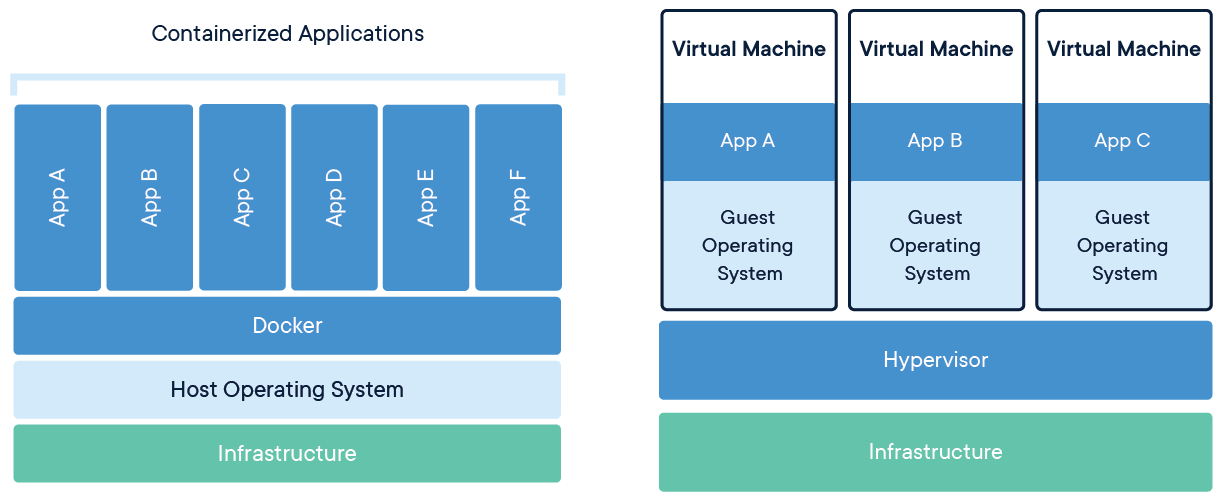
Virtual Machines (VMs)
Virtual machines (VMs) are an abstraction of physical hardware turning one server into many servers. The hypervisor allows multiple VMs to run on a single machine. Each VM includes a full copy of an operating system, the application, necessary binaries and libraries – taking up tens of GBs. VMs can also be slow to boot.
Containers
Containers are an abstraction at the app layer that packages code and dependencies together. Multiple containers can run on the same machine and share the OS kernel with other containers, each running as isolated processes in user space. Containers take up less space than VMs (container images are typically tens of MBs in size), can handle more applications and require fewer VMs and Operating systems.
Docker Architecture
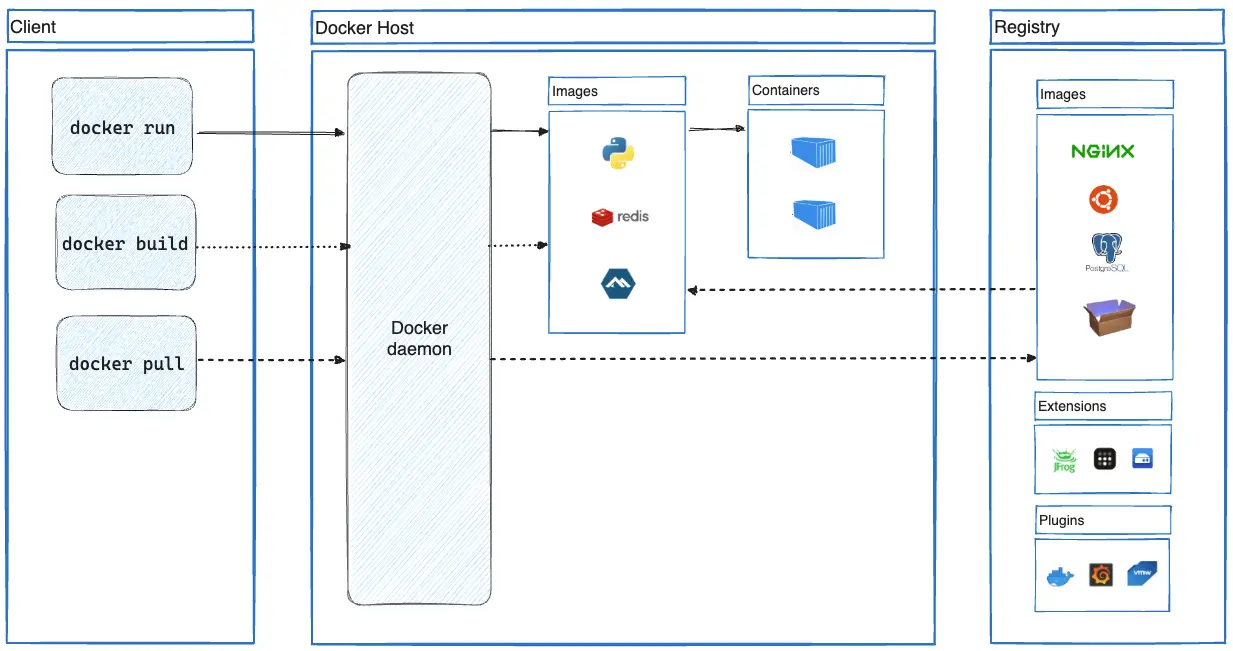
The Docker Client and Host (Server) in combination is called the Docker Engine. Docker Engine is an open source containerization technology for building and containerizing your applications. Docker Engine acts as a client-server application with:
- A server with a long-running daemon process
dockerd. - APIs which specify interfaces that programs can use to talk to and instruct the Docker daemon.
- A command line interface (CLI) client
docker.
You can read more details about the Docker Architecture here.
We'll cover Registry on the core concept below.
Installation
You can install docker directly from their website at https://docs.docker.com/get-docker/.
Docker Concepts
1. Dockerfile
A Docker file is a file containing steps to building your docker image.
Example of an awesome Dockerfile can be found here. What's great about this image is that it sets up conda and jupyter server, which is useful when working on research related work.
With Docker file, you can share this with anyone and that person will get the same exact image as you after it's built. Also, since it is a file, you can version control it with git.
2. Docker Image
A Docker Image is the "built" version of a Docker file. This typically live on your internal Docker host or an external Registry, so you can't store a Docker image in git.
An example of a docker image that has been built with the Docker file above can be found here. That is the published image for with specific file sha, which allows for a specific version of that image, just like your regular files!
3. Docker Container
A container is a standard unit of software that gets spun up from an image. This is the running software application that you have built. It is lightweight and easily scalable and tools like Kubernetes are used to orchestrate the deployment of these containers in production.
4. Container Registry
As mentioned above, container images can be stored in a Registry. A container registry is a centralized place to store, manage, distribute, and retrieve container images.
The most popular free registry currently is Docker Hub, but there is now the Github Container Registry as well.
Like an app store, Docker Hub serves various images and image versions. As you can see here these are the various tags for the example image.
You can go through the Docker 101 lab to practice the concepts above! And the official Docker website has lots of great "getting started" learning resources.
5. Docker Orchestration
Containerization has changed how we build and run applications. It allows apps to run consistently across different environments, from development laptops to production servers. However, as applications grow, managing many containers becomes challenging.
This is where orchestration tools come in. They help automate the deployment, scaling, and management of containerized applications. Key benefits include:
- Automating application maintenance
- Automatically replacing failed containers
- Managing updates and configurations
Two popular orchestration tools are Kubernetes and Docker Swarm mode.
Kubernetes
Kubernetes (K8s) is an open-source container orchestration platform that automates many of the manual processes involved in deploying, managing, and scaling containerized applications. It provides a robust set of features for cluster management, service discovery, load balancing, and more. For a detailed guide on Kubernetes, see our Kubernetes page.
Swarm
Docker Swarm is an open-source container orchestration platform that is native to Docker. It converts multiple Docker instances into a single virtual host. Unlike Kubernetes' steeper learning curve, Swarm mode integrates seamlessly with Docker CLI, providing built-in service discovery, load balancing, and rolling updates with minimal configuration. For more details, see our Docker Advanced page.
Differences between Kubernetes and Swarm
While both Docker Swarm and Kubernetes do manage containers across multiple hosts, the way they do it and the level of abstraction they provide differ. Docker Swarm's approach is more straightforward, while Kubernetes offers a more comprehensive but complex cluster management system. You can gain a better understanding of the distinction by reviewing the Kubernetes and Docker Advanced pages.