Conda/Mamba
Conda: Your Virtual Environment and Package Manager
Conda is a package management and environment management system that simplifies the process of setting up, managing, and sharing software packages and libraries. It is particularly popular in the Python ecosystem but can be used for multiple programming languages. Conda allows users to create isolated virtual environments, each with its own set of dependencies and packages. This isolation ensures that different projects or tasks do not interfere with each other.
Key Features:
- Package Management: Conda offers an extensive repository of pre-built packages and libraries. Users can easily install, update, and remove packages using simple commands.
- Environment Isolation: Virtual environments created with Conda can have their specific Python versions and libraries. This helps avoid compatibility issues between projects.
- Cross-Platform Compatibility: Conda works seamlessly across Windows, macOS, and Linux, making it ideal for cross-platform development and deployment.
Installation
There is a community maintained distribution of conda called Miniforge that we recommend. Miniforge repository has minimal installers for Conda and Mamba specific to conda-forge, a community conda package repository.
Concepts of Conda
💡 Conda Help and Manual
To see the full documentation for any command, type the command followed by --help. For example, to learn about the conda update command:
1. Environments
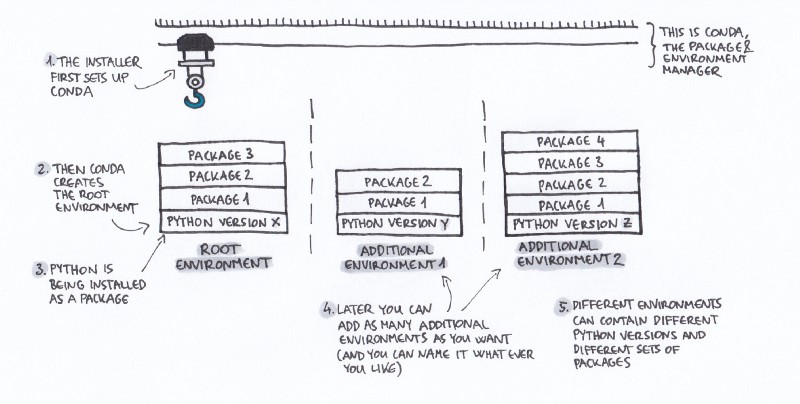
What is a conda environment?
- Similar to python virtual environments (venv)
- A set of isolated packages in a directory
- Able to be shared via environment files
# List out available environments
conda env list # The starred * environment is the current activate environment

# Create conda environment from command line (Not Best Practice)
conda create --name myenv --channel conda-forge python=3.10

# Activate conda environment
conda activate myenv

# Deactivate conda environment
conda deactivate

# Create conda environment from environment file (Recommended Best Practice)
conda env create --file environment.yml

# Removing conda environments
conda env remove --yes --name myenv
Sample of environment.yml
name: tutorial-env
channels:
- conda-forge
dependencies:
- python=3.7
- numpy
- matplotlib
- pandas
- bokeh
- rise
- nb_conda_kernels
- ipykernel
⭐ Best practice to share environments
1. When starting a new environment, always generate it from an environment file rather than the command line. 2. As you add packages to the environment, be sure to update the environment file. 3. Unless you have to (i.e. Production Environments), try to avoid specifying the version of each package. This will ensure you have the most up to date version that will work across platform. If you follow these guidelines, you should be able to give your environment file to anyone, and they will be able to install your packages with no problem. **NOTE: In addition to the above practice, you can also use a tool called [`conda-lock`](https://github.com/conda/conda-lock). This tool allows you to completely capture the exact versions of packages in your environment from an `environment.yml` at that time of locking. This allows for greater reproducibility across all platforms.**
2. Channels
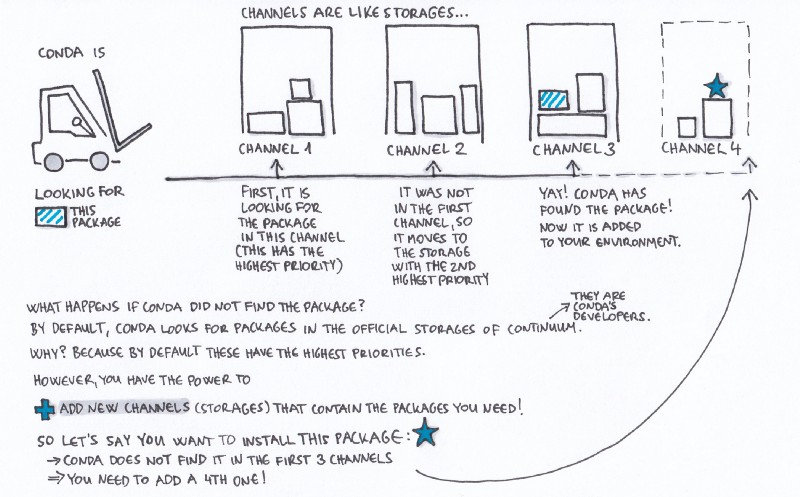
What is a conda channel?
- Similar to linux repository (or app store)
- The service is hosted for free at Anaconda Cloud
# List out your channels and priorities

conda config --get channels

# If you have a few trusted channels that you prefer to use, you can pre-configure these so that every time you are creating an environment, you won’t need to explicitly declare the channel.

conda config --add channels conda-forge

# strict priority and conda-forge at the top will ensure
# that all of your packages will be from conda-forge unless they only exist on defaults

conda config --set channel_priority strict
conda config --set show_channel_urls True
NOTE: The highest priority channel is where your packages will be installed from no matter if another channel has a higher version!
⭐ Conda Forge Channel
[Conda forge](https://anaconda.org/conda-forge) is a community led collection of recipes, build infrastructure and distributions for the conda package manager.
Watch Filipe’s talk from pycon, one of the conda-forge lead developer,
3. Packages
What is a conda package?
- A compiled software package, but when installed also include all of its dependencies even the lower level ones
- Cross platform
- Made from recipes
You can search for conda packages at https://anaconda.org/ or the terminal shown below.
# Look at the packages you have installed
conda list

# Let's search for gdal conda
conda search gdal

# Install a single conda package
conda install -c conda-forge gdal

# Or install multiple packages
conda install -c conda-forge gdal fiona

# Removing a conda package
conda remove -n myenv gdal
4. Recipes
Instruction on how to compile the conda package and its metadata
package:
  name: pandas
  version:
source:
  url: https://github.com/pydata/pandas/archive/v.tar.gz
  sha256: d9f67bb17f334ad395e01b2339c3756f3e0d0240cb94c094ef711bbfc5c56c80
build:
  number: 0
  script: python setup.py install --single-version-externally-managed --record=record.txt
about:
  home: http://pandas.pydata.org
  license: BSD 3-clause
  summary: 'High-performance, easy-to-use data structures and data analysis tools.'
extra:
  recipe-maintainers:
    - jreback
    - jorisvandenbossche
    - TomAugspurger
If you have a python library and wanted to quickly create a conda recipe, you can simply use an awesome tool developed by the people at conda-forge called grayskull.
5. Solver
This is not a core concept, but is something to be aware of as you're working with conda.
One of the wonderful feature of conda is the ability to solve version dependencies for all the packages to be installed under the hood.
This requires some algorithm to be executed and as of late, the default classic solver for conda can be very slow at performing this solving.
As of March 16th, 2022, there is now a faster solver for conda called libmamba.
You can simply install this solver:
And then set this solver as default:
For more information and technical details about this, go to https://conda.github.io/conda-libmamba-solver/libmamba-vs-classic/