Docker Advanced
Docker Swarm
Note There are some similar tools that you might find confusing when it comes to Docker Swarm: 1. Swarm mode * This is what we are referring to 2. SwarmKit * This project contains the underlying libraries used by Swarm mode 3. Classic Swarm * Docker's original orchestration tool. Classic Swarm is no longer actively developed, and you should focus on Swarm mode instead
In this guide, we will focus on Swarm mode and its related technologies.
Swarm mode is a built-in tool for managing a cluster, which is particularly useful for those of us looking to distribute and scale machine learning workloads across multiple machines with ease.
Additionally, Swarm mode offers a set of features. These features make Swarm a powerful tool for managing containerized applications. By leveraging Swarm, users benefit from improved scalability, enhanced security, streamlined deployment processes, etc.
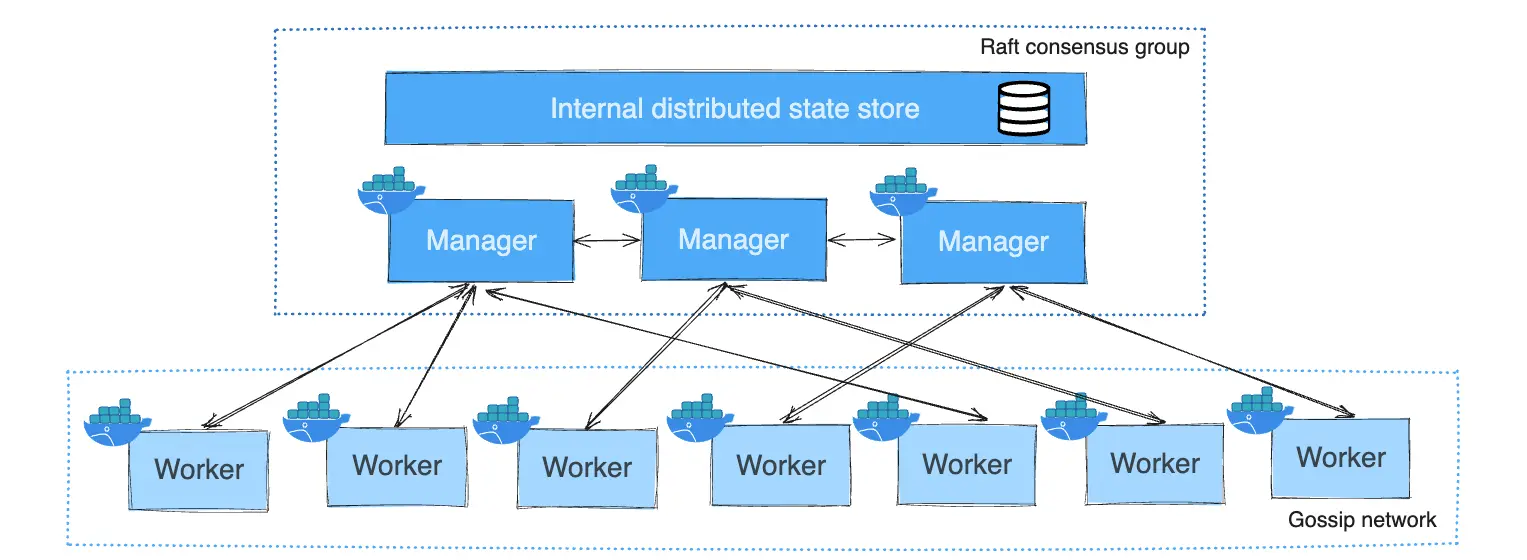
Core Concepts
- Swarm: A cluster of one or more Docker Engines. A swarm consists of one or more nodes: physical or virtual machines running Docker Engine.
- Node: A Docker Engine participating in the swarm (manager or worker).
- Service: The definition of tasks to execute on nodes.
- Task: A Docker container running on a node, representing the atomic unit of scheduling.
Task Lifecycle
Tasks in a swarm go through various states, including NEW, PENDING, RUNNING, and COMPLETE. Understanding these states can help in monitoring and troubleshooting ML jobs.
For more details on task states, please visit: Swarm task states.
Getting Started
To start using Docker Swarm mode:
- Initialize a swarm (cluster) of Docker Engines
- Add worker nodes to the swarm
- Deploy services to the swarm
- Scale services as needed
For specific commands and a detailed tutorial, please refer to: Swarm mode official tutorial.